PDF markup for drawing review
PDF markup software for architects.
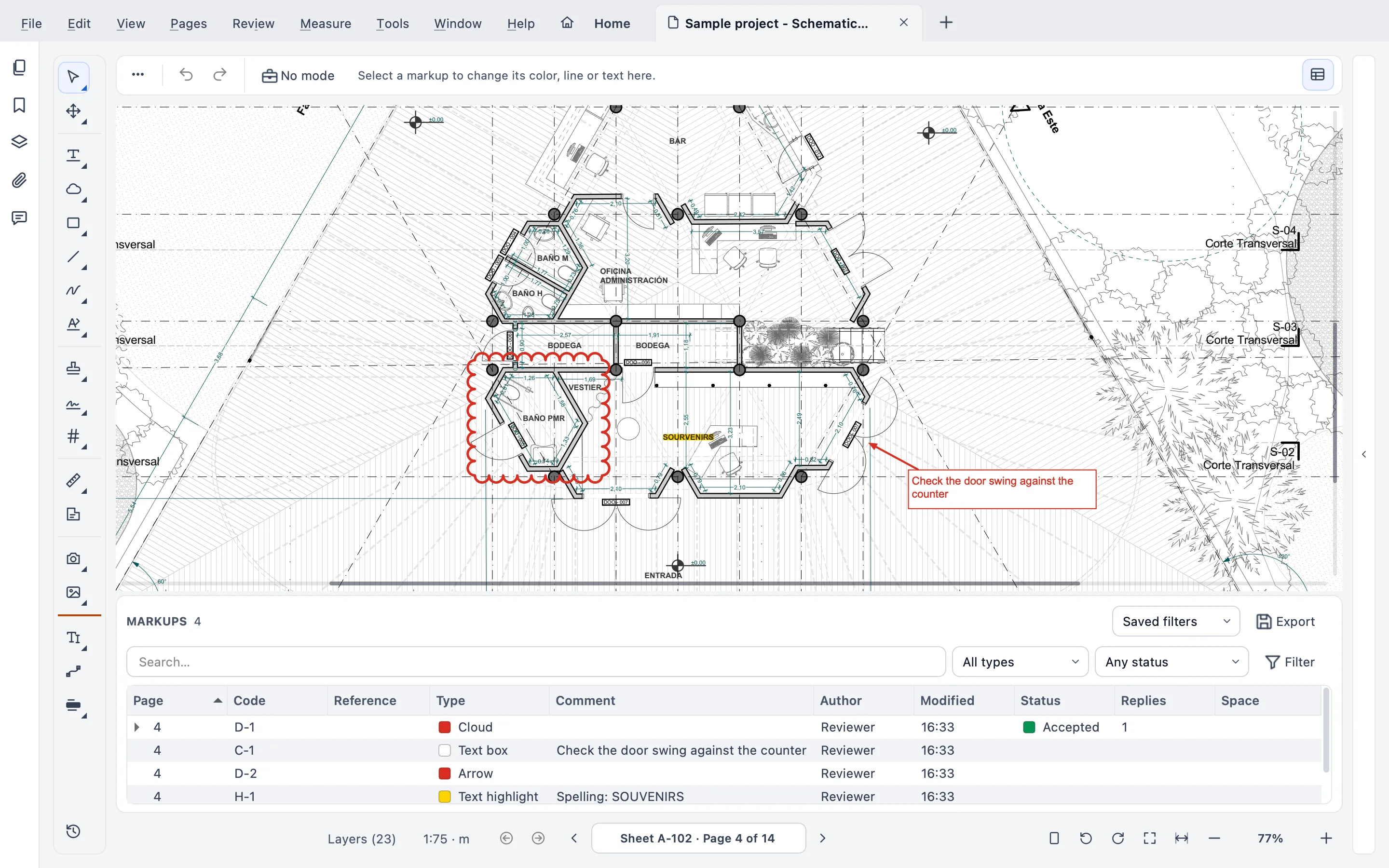
Cloud the change, call it out, tag it with a keynote. Every markup in Stamppa is a record with a code, so a review of a drawing set ends as a list you can filter, assign and send.
Installs on Windows 10/11 and Mac (Apple Silicon). Send yourself the link.
Free for 14 days with every feature, just your email, no card. If you don’t buy, it stays a free PDF viewer.
- Every markup
- A code, like M‑0007
- Your drawings
- Stay on your computer
The tools
Every mark a drawing review needs
The markup tools reviewers reach for every day, with keyboard shortcuts you can change and share with your team. Can’t remember where one is? Press ⌘K / Ctrl+K and type part of its name.
Clouds, callouts and notes
Revision clouds, polygon clouds, callouts, notes, text boxes and the Text line tool. What you type lands exactly where you see it.
Arrows, lines and shapes
Arrows, polylines, rectangles, ellipses, polygons, circles and regular polygons, with 19 line starts and ends: arrows, dots, architect’s ticks, datum.
Pen and highlighter
Pen and highlighter with pen pressure, an eraser and a lasso, and text highlight, underline and strike-out.
Hatches and keynotes
Hatches for areas, and keynotes with legends that update themselves as you add or change a keynote.
Text style
Font, size, bold, italic and color for every markup with words, and for the drawing’s own text (Shift+X).
Edit the drawing’s text
Edit word (Shift+W), Edit line (X) and Edit paragraph (Shift+Y) retype the drawing’s own text a whole word, line or paragraph at a time. A paragraph flows again inside its width, with alignment, indents and line spacing.
Spell check
Notes, text boxes and text typed on the sheet are checked with your computer’s own dictionary, in English or Spanish: suggestions, Add to dictionary and Ignore.
Paste in place
Copy markups and paste them on the same spot of another sheet, of several sheets, or of every open PDF.
Mark all like this
Right-click a markup or a count on a drawn symbol: Stamppa finds the same symbol on the page, on every page or in the whole set, you leave out any match, and the rest are marked in one step. On vector drawings, not on scans.
Markups list
A review you can sort, filter and send
The Markups list works like Bluebeam’s: one row per markup, with its type, author, status and measurement.
Codes and references
Every markup gets a code (M-0007) and a Reference of your own, so “see C-1” means the same thing to everyone.
Columns and saved filters
Choose your columns, filter any of them, and save the filters you use every week.
Layers per reviewer
Markup layers keep each reviewer or discipline apart, so each one’s comments stay easy to find.
Summaries of many files
One markup summary of several files at once, in PDF, CSV or Excel.
Review as a team
Set up once, share through a folder
No server and no cloud: your team’s tools, tasks and markups travel in files you already share.
Send for review
Review ▸ Review round ▸ Send for review… makes one marked copy per reviewer, with a due date and a message. Reviewers mark up in the free reader mode and send back only their markups; Stamppa merges them into your PDF with author and date, and shows who is still missing.
Tool Chest and work modes
Your own tools and variations in the Tool Chest. Work modes for Review, Approval, Field or Engineer set color, layer, author, statuses and stamp in one click, and your team shares them through a folder.
Tasks and punch list
Pins with an assignee, a due date, a status and photos. Reports in PDF, CSV or Excel, and the tasks travel inside the PDF or an XFDF file.
XFDF in and out
Markups kept apart from the PDF come in and go out as XFDF, from Review ▸ Markups ▸ Import markups (XFDF)… and Export markups (XFDF)… in the menu.
Markups are standard PDF annotations: the ones you add in Stamppa open in Bluebeam and Acrobat, and theirs open in Stamppa.
What it costs
Every markup tool, in every plan
Pay once a year and Stamppa 27 is yours forever, with every 27.x update, including the ones released after you cancel. It renews at your same price. There is a monthly plan too: after 12 months paid in a row, that day’s version is yours.
Prices in US$, excluding tax.Prices in euros, VAT included.Prices in pounds, VAT included.Prices in Swiss francs, VAT included.
Founder price · first 100 customers
No add-ons and no feature tiers. Full pricing
Free for 14 days with every feature, just your email, no card.
Questions about markup
Ask Gus anything elseWill my markups open in Bluebeam or Acrobat?
Yes. Stamppa saves markups as standard PDF annotations, so Bluebeam Revu and Adobe Acrobat show them, and the markups you made there open in Stamppa. Line starts and ends survive the trip too. Markups kept in a separate file come in and go out as XFDF.
Can several reviewers mark up the same set?
Yes, by sharing files, not live. Send for review gives each reviewer a copy and merges their markups back into yours; they need no license, because the free reader mode adds notes, highlights and clouds. Markup layers keep each reviewer or discipline apart, the Markups list filters by author or layer, and tasks travel inside the PDF or an XFDF file. There are no live cloud sessions, because Stamppa has no cloud.
Can I export the list of markups?
Yes. A markup summary covers one file or several at once, in PDF, CSV or Excel, and the punch list has its own report in the same three formats.
Does it work on a Mac?
Yes. Stamppa runs natively on Macs with Apple Silicon (macOS 12 or later) and on Windows 10 and 11. It is the same app on both, with the same markup tools.
Can I mark up for free?
Partly. Without a license Stamppa is a free PDF viewer (reader mode): view, search and print, see every markup, and add notes, highlights and clouds. The other tools open with the 14-day trial or a license.
Can an AI assistant place markups for me?
Only if you turn it on. In Settings ▸ AI assistant, Stamppa can let an AI app on your own computer read the open set and add or change markups, through a local MCP server. It is off by default, every change is one step you can undo and is signed as made by the assistant, and Stamppa itself sends nothing anywhere: what leaves your computer is up to the assistant you connect.
Mark up your next drawing set in Stamppa
Free for 14 days with every feature. Open a set you are reviewing this week.
Windows 10/11 · macOS (Apple Silicon)