Batch Stamp · a tool inside the Stamppa PDF viewer
Stamp a whole drawing set in one go.
Received, Approved, For Construction: one stamp on hundreds of sheets, with the date, the sheet number and the revision filled in on each one. Then undo it with one click if you need to.
Stamppa installs on Windows 10/11 and Mac (Apple Silicon). Send yourself the link.
Free for 14 days with every feature, just your email, no card. If you don’t buy, it stays a free PDF viewer.
The browser demo stamps up to 10 sheets. Nothing is uploaded.
Gus, a construction project manager, built Batch Stamp to stamp his own drawing sets. That’s where the name Stamppa comes from.
How it works
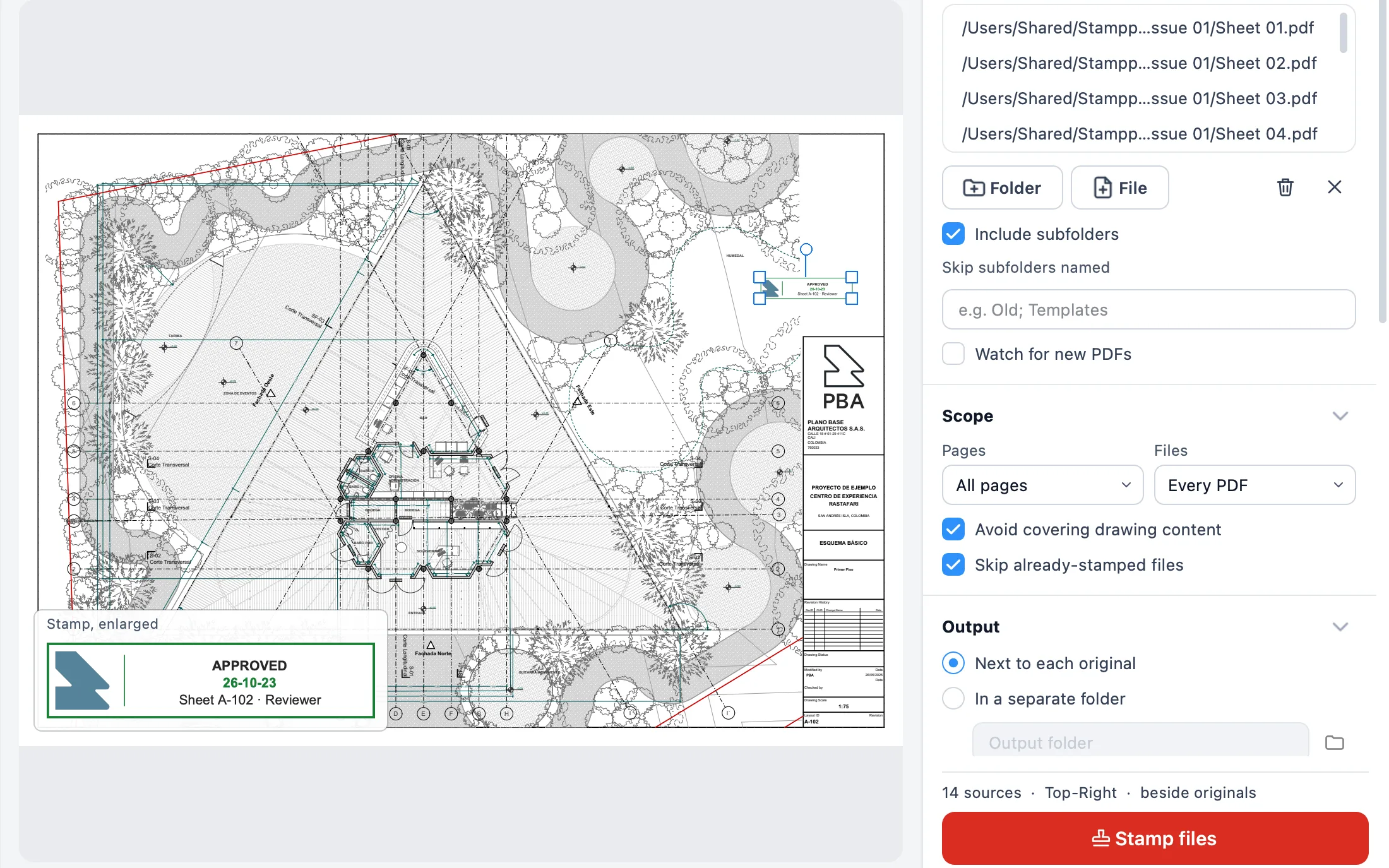
Pick the folder, check, stamp
Pick a folder and a template
Point Batch Stamp at a whole folder of PDFs and choose a saved template: Received, Approved, For Construction, Superseded or one of your own.
Let it check first
Before every run it looks for clear space on each sheet and moves the stamp off the drawing. Any sheet without room is listed before anything is stamped.
Stamp the set
Every sheet gets its stamp, with its own date, sheet number and revision. Changed your mind? One click undoes the last run.
Dynamic fields
One template, the right details on every sheet
Write the stamp once with a few placeholders. On each sheet Stamppa fills them in: the day you stamp, that sheet’s number and revision, the page, your name and a running number for your transmittals.
RECEIVED {date} · {sheet} Rev {rev} · {user}RECEIVED 2026-10-22 · A-101 Rev B · G. Mejía{date}- the day you stamp
{sheet}- the sheet number
{rev}- the revision
{page}- the page number
{user}- your name
{seq}- a running number
Document control
A record of what came in, what was approved and when
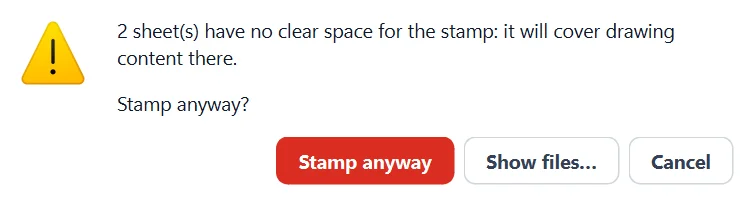
A check before every run
Stamps move to clear space so they don’t cover the drawing, and sheets with no room are flagged before you stamp.
Superseded archive
When a newly stamped sheet replaces an older one, the old file moves to a Superseded folder beside it. Nothing is overwritten.
One-click undo
Stamped the wrong set? Undo the last run and the originals come back.
Transmittal
A CSV of every run: each file stamped, skipped or archived, with the time and the output, ready for your transmittal.
Stamp Studio
Design your own stamps
Make and edit stamps without leaving the document, and keep them as tools you reach in one click.
- Design and edit. Text, date and logo, edited right next to the sheet.
- Status stamps. Stamps that also write a review status on the markup, such as Approved.
- A starter gallery. Ready-made stamps to start from and adjust.
- In your Tool Chest. Each stamp becomes a tool, with its own shortcut, shared with your team through a folder.
- Designed on the web. Design a stamp in the browser demo, download it as a .stamppastamp file and open it in the app.
Signatures
Sign the whole set, not one sheet at a time
Certificate signing for a whole set
Sign with your digital certificate (PAdES), on one PDF or on every sheet of a set at once: a .pfx file, or one already in your Mac’s Keychain or the Windows certificate store, without exporting the key. Long-term validation (LTV) keeps the signature verifiable after the certificate expires. Visual signatures are there too.
Locked signatures, burnt into the page
A locked signature becomes part of the page, and the PDF is saved protected against editing in other programs. Most programs respect that protection; it is not absolute security.
Ask others to sign, in order
Review ▸ Stamp & sign ▸ Request signatures… asks each person to sign in turn, by a due date. The request and every signature travel in the PDF, with a signature record at the end. A drawn signature does not prove who signed; for that, use a certificate.
No install needed to try it
Stamp up to 10 sheets right in your browser
Design a stamp, drop in your PDFs and stamp them. It all happens on your computer: nothing is uploaded. Then take the template to the app.
What it costs
Batch Stamp comes with Stamppa
Not a separate purchase: every plan has the viewer, the editor and every tool. Pay once a year and Stamppa 27 is yours forever, with every 27.x update, including the ones released after you cancel. It renews at your same price. There is a monthly plan too: after 12 months paid in a row, that day’s version is yours.
Prices in US$, excluding tax.Prices in euros, VAT included.Prices in pounds, VAT included.Prices in Swiss francs, VAT included.
Founder price · first 100 customers
14 days with every feature, started with just your email. No card.
Questions about batch stamping
Ask Gus anything elseCan I stamp multiple PDFs at once?
Yes. Batch Stamp works on whole folders of PDFs in one go, with the same template on every sheet and the date, sheet number and revision filled in on each one.
Will the stamp cover my drawing?
Not if you let it avoid the drawing. Before every run Batch Stamp checks each sheet, moves the stamp to clear space, and lists any sheet that has no room so you decide before stamping.
What if I stamp the wrong set?
Undo the last run with one click and the originals come back. When a new sheet replaces an old one, the old file is kept in a Superseded folder beside it.
Can I try it without installing anything?
Yes. The browser demo on stamppa.com lets you design a stamp and stamp up to 10 PDF sheets. Nothing is uploaded, and you can take the stamp you designed into the app.
Is Batch Stamp sold separately?
No. It’s one of the tools inside Stamppa, a PDF viewer and editor for drawing sets. Every plan has every tool: US$39 a year for one person at the Founder price, one payment, with a 14-day free trial.
Stamp your next set with Stamppa
Free for 14 days with every feature. Start with the folder you have to stamp this week.
Windows 10/11 · macOS (Apple Silicon)