PDF tools · in the Stamppa PDF viewer and editor
Sign PDFs on your own computer.
Place a drawn signature, sign with your digital certificate, or send a PDF to several people to sign in turn. The signatures and the record of who signed travel inside the PDF, with no outside service.
Installs on Windows 10/11 and Mac (Apple Silicon). Send yourself the link.
Free for 14 days with every feature, just your email, no card. If you don’t buy, it stays a free PDF viewer.
Why do it in Stamppa
Your files never leave your computer
Stamppa is a fast PDF viewer and editor for Windows and Mac. It works offline and never uploads your documents: it connects only to confirm your license. Online PDF sites ask you to upload the file first; here it stays on your disk.
It’s at its best with construction drawings: measure to scale, compare revisions and batch stamp whole sets.
Works offline
On a plane, on site or behind a strict firewall, the tools work the same.
Nothing is uploaded
No cloud and no telemetry. Contracts, IDs and drawings stay with you.
Windows and Mac
One app on Windows 10/11 and on Mac (Apple Silicon), in English and Spanish.
How it works
Three ways to sign
Draw or place your signature
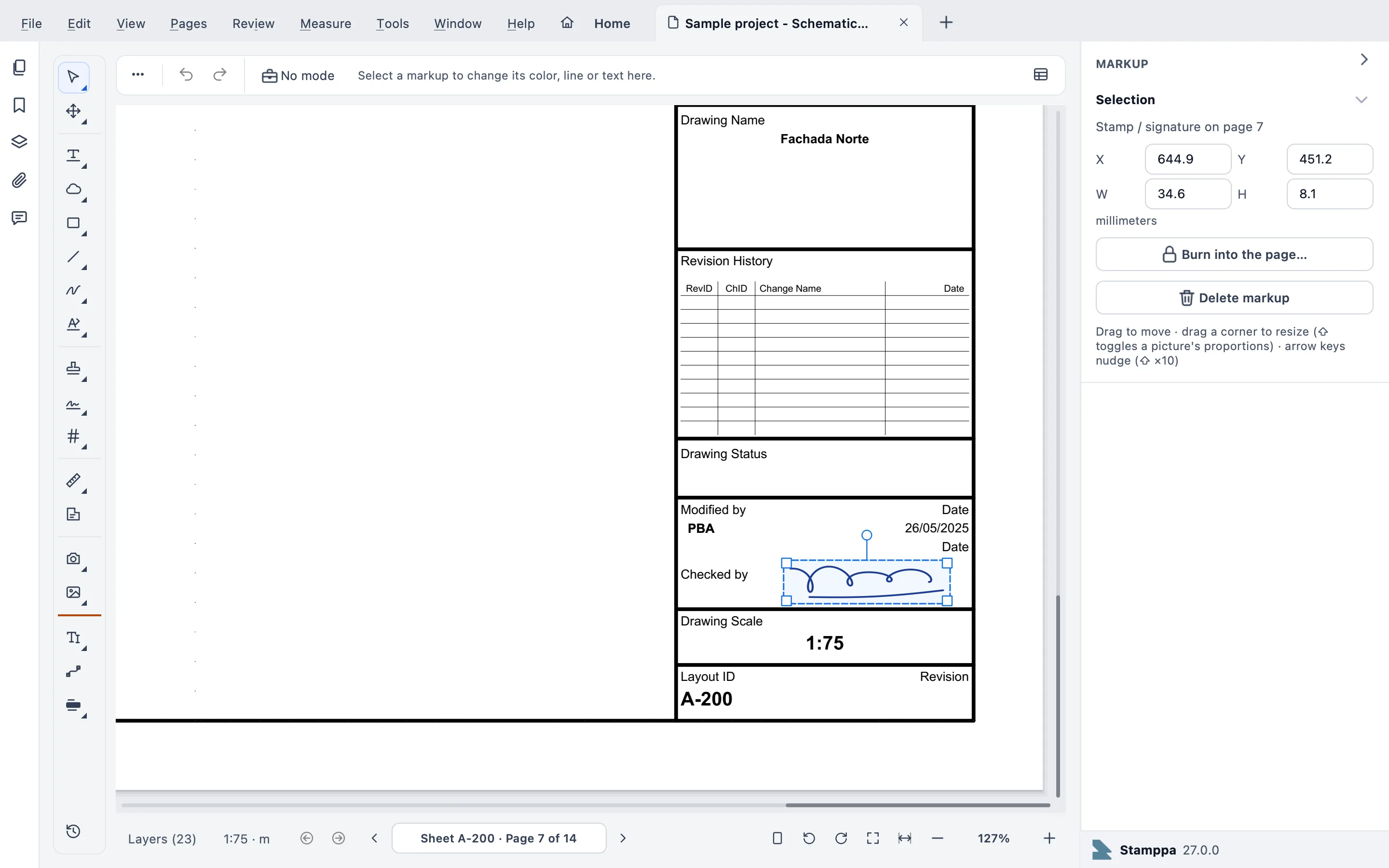
Review ▸ Stamp & sign ▸ New signature… saves your signature; place it on the page, then burn it in.
Or sign with your certificate
Review ▸ Stamp & sign ▸ Sign with certificate… uses a .pfx file, or one already in your Mac’s Keychain or the Windows certificate store.
Or ask others to sign
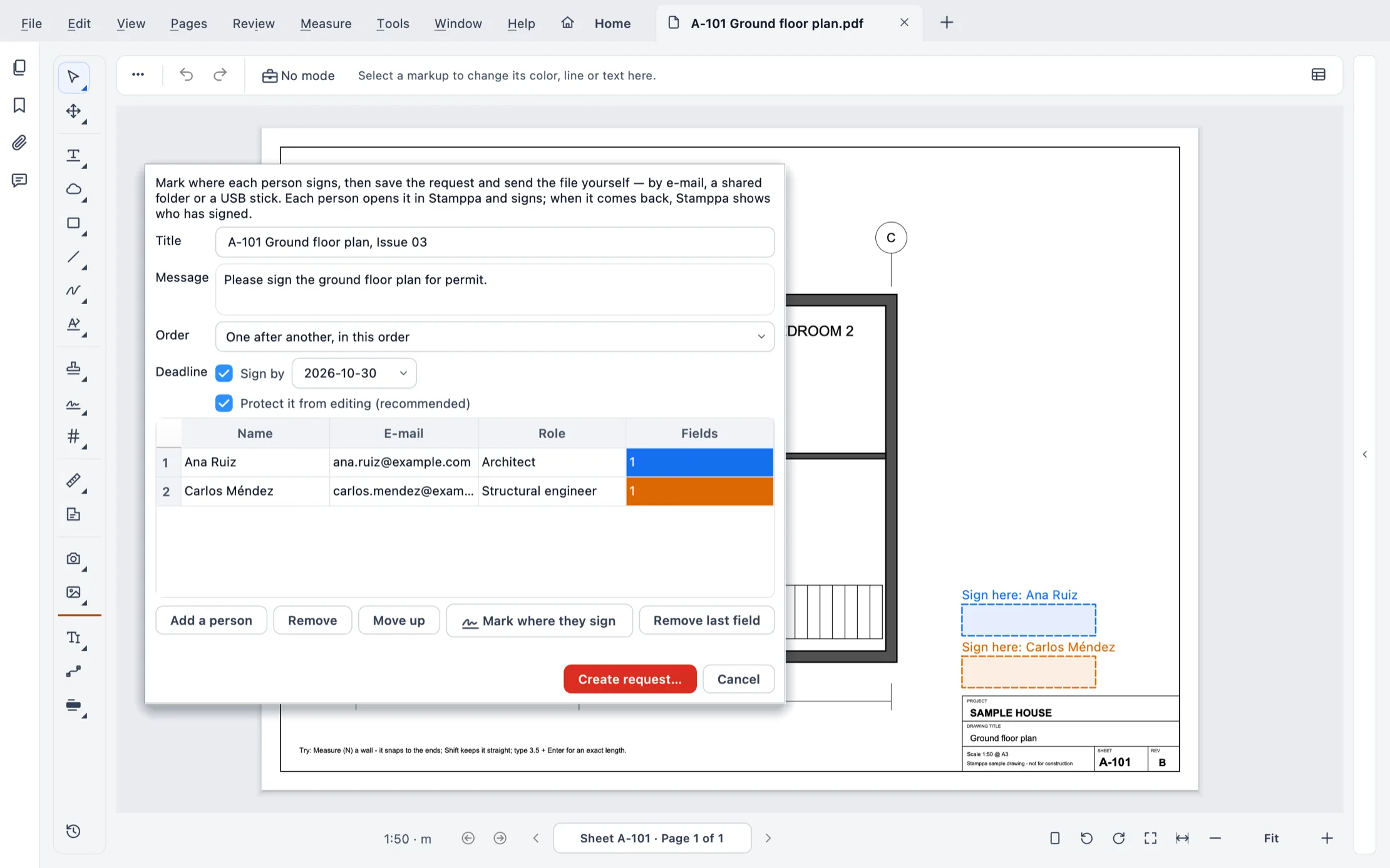
Review ▸ Stamp & sign ▸ Request signatures… marks where each person signs, in order and by a due date. You send the file yourself.
What it does
From a quick signature to a certified one
Certificate signatures (PAdES)
With a .pfx file or straight from the macOS Keychain or the Windows certificate store. The key never leaves it.
Long-term validation (LTV)
Keeps the signature verifiable after the certificate expires.
A whole set at once
Sign every PDF of a set with your certificate in one go; each file gets a signed copy.
Signature requests, in order
Each step is recorded inside the PDF, and Stamppa shows what is proven and what is not.
Locked signatures
A locked signature is burnt into the page and the PDF is saved protected against editing in other programs.
See who signed
Review ▸ Stamp & sign ▸ Signatures… lists who signed, when, and whether each signature checks out.
A drawn signature does not prove who signed; a certificate signature does. Locked signatures are protected against editing, and most programs respect that lock, but it is not absolute security. Stamppa doesn’t give legal advice about what your country or profession requires.
What it costs
Every tool in every plan
Pay once a year and Stamppa 27 is yours forever, with every 27.x update, including the ones released after you cancel. It renews at your same price. There is a monthly plan too: after 12 months paid in a row, that day’s version is yours.
Prices in US$, excluding tax.Prices in euros, VAT included.Prices in pounds, VAT included.Prices in Swiss francs, VAT included.
Founder price · first 100 customers
Free for 14 days with every feature, just your email, no card.
Common questions
Ask Gus anything elseWhat is the difference between a drawn signature and a digital signature?
A drawn signature is a picture of your signature on the page: it shows agreement but doesn’t prove who placed it. A digital signature uses your certificate: it proves who signed and shows if the file changed afterwards.
Can I use the certificate I already have?
Yes. Use a .pfx or .p12 file, or a certificate already in your Mac’s Keychain or the Windows certificate store, without exporting its key.
How do I get several people to sign one PDF?
Use Request signatures: add each person, mark where they sign, choose the order and a due date, and send the file by email, a shared folder or a USB stick. Each person opens it in Stamppa and signs; when it comes back, Stamppa shows who has signed.
Can someone change the PDF after I sign it?
A certificate signature shows any change made after signing. A locked signature also saves the PDF protected against editing; most programs respect that protection, but it is not absolute security.
Is it free?
Without a license Stamppa is a free PDF viewer: view, search, print, notes, highlights and clouds. This tool is part of the paid plans, and every plan has every tool. Try them all free for 14 days with just your email.
Sign your next PDF in Stamppa
Free for 14 days with every tool. Start with the document waiting for your signature.
Windows 10/11 · macOS (Apple Silicon)