PDF takeoff and measuring
Measure PDF drawings to scale.
Calibrate a sheet, or use the scale already set in Acrobat or Bluebeam. Then measure lengths, areas, counts and volumes that snap to the drawing, and take the quantities to Excel.
Installs on Windows 10/11 and Mac (Apple Silicon). Send yourself the link.
Free for 14 days with every feature, just your email, no card. If you don’t buy, it stays a free PDF viewer.
- Scale
- Calibrated, or read from the PDF
- Quantities
- To Excel, by space and level
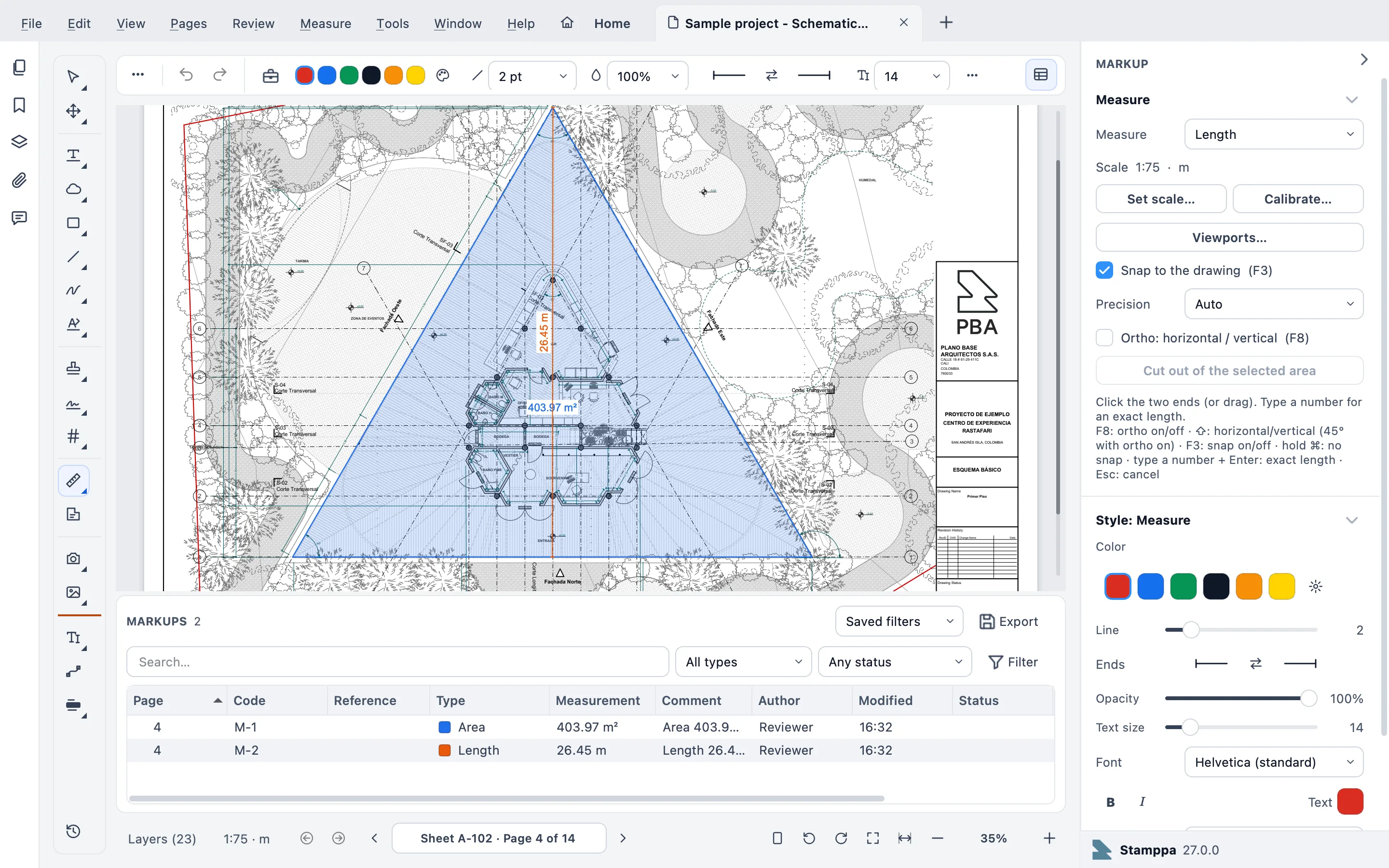
How it works
From scale to spreadsheet in three steps
Set the scale
Calibrate on a dimension you know, set the scale, or keep the one set in Acrobat or Bluebeam: Stamppa reads the page scale and viewports from the PDF.
Measure on the drawing
Click the two ends, or drag. Snap to the drawing’s lines (F3), keep it straight with ortho (F8), or type a number and press Enter for an exact length.
Take off the quantities
Each measurement lands in the markups list with its own code. Export the takeoff to Excel, or keep a Quantity Link that updates its own sheet in your workbook.
What you can measure
A full PDF measurement tool for construction
The measuring tools estimators and project managers use every day, at the drawing’s own scale.
Calibrate or read the scale
Calibrate on a known dimension, or use the page scale and viewports set in Acrobat or Bluebeam.
Length, perimeter and area
Areas with cut-outs for shafts, stairs and courtyards, and perimeters from the same shape.
Count, angle, volume and arc
Count fixtures and doors, read angles, and measure volumes and arcs on the same sheet.
Dimensions
Dimensions with extension lines, drawn at the sheet’s scale like on the drawing itself.
Separate X and Y scales
For sheets whose horizontal and vertical scales are not the same.
Snap like CAD, or type it
Snap to the drawing’s lines and ends, and to its curves: the center and quadrants of arcs, circles and door swings. Or type an exact value instead of clicking.
Spaces per room
Define each room with a dynamic fill you review before accepting, and get quantities by space and level. A door swing closes the room.
A markups list with codes
Every measurement gets a code, like M-0007, in a Bluebeam-style list with columns and saved filters.
Georeferenced site plans
On a georeferenced PDF the pointer shows latitude and longitude, you measure in meters on the ground, and your points export to CSV with their coordinates.
From takeoff to estimate
Price the takeoff without leaving the drawing
Give each measurement or space a cost item from your own price list, and Stamppa adds up the estimate from the same quantities, in your currency.
No price database comes with Stamppa: the estimate uses the prices you enter or import.
Your own price list
Unit prices by material or work item in Measure ▸ Estimate ▸ Price list…, typed in or imported from Excel or CSV.
Assemblies
Wall type 3 = block + plaster + paint, each with its rate per unit of what you measure and an optional waste percentage.
A cost item on each measurement
Assign it from the right-click menu or fill it down in the Markups list. It travels in the PDF with the markup.
Totals, to Excel
Export the estimate with totals by sheet, level and space, or add it as its own sheet to your Quantity Link workbook.
Coming from Bluebeam or Acrobat
Your scales come with your PDFs
A page scale or viewport set in Bluebeam or Acrobat is read as it is, so you can measure the moment the PDF opens, without calibrating again.
And on a Mac: Bluebeam set the end of life of Revu for Mac on June 28, 2023. Stamppa measures natively on Mac and Windows, and works offline.
Stamppa as a Bluebeam alternativeBluebeam fact checked on October 22, 2026. Source: Revu for Mac end of life
What it costs
Every feature in every plan
Pay once a year and Stamppa 27 is yours forever, with every 27.x update, including the ones released after you cancel. It renews at your same price. There is a monthly plan too: after 12 months paid in a row, that day’s version is yours.
Prices in US$, excluding tax.Prices in euros, VAT included.Prices in pounds, VAT included.Prices in Swiss francs, VAT included.
Founder price · first 100 customers
Free for 14 days with every feature, just your email, no card.
Questions about measuring
Ask Gus anything elseCan I measure a PDF that already has a scale?
Yes. If the scale or the viewports were set in Acrobat or Bluebeam, Stamppa reads them from the PDF and you can measure right away. If not, calibrate on a dimension you know, or set the scale yourself.
What can I measure?
Length, area with cut-outs, perimeter, count, angle, volume and arc, plus dimensions with extension lines. Horizontal and vertical scales can be set apart, and measurements snap to the drawing like in CAD or take an exact value you type.
How do the quantities get to Excel?
Export the takeoff to Excel, or set up a Quantity Link, which updates its own sheet in your workbook. With Spaces, quantities are grouped by room and level.
Can it make an estimate?
Yes, from your own prices. Keep a price list in Measure ▸ Estimate ▸ Price list…, with unit prices and assemblies, give each measurement or space a cost item, and export the estimate to Excel with totals by sheet, level and space, or add it to your Quantity Link workbook. Stamppa comes with no price database.
Does it read georeferenced PDFs?
Yes, it reads them. On a site plan whose PDF carries a georeference, the pointer shows latitude and longitude (and easting and northing in UTM), distances and areas are measured on the ground in meters, and Review ▸ Markups ▸ Export points with coordinates (CSV)… saves the points of your measurements and markups. Stamppa does not add a georeference to a PDF that has none.
Does it run on a Mac?
Yes, natively on Macs with Apple Silicon, and on Windows 10 and 11. It works offline and never sends your documents.
Learn moreHow to measure a PDF drawing to scale →
Measure your next set in Stamppa
Free for 14 days with every feature. Try it on the drawings you are taking off this week.
Windows 10/11 · macOS (Apple Silicon)