Bluebeam alternatives for construction drawings
Bluebeam Revu, Acrobat Pro, Drawboard, PlanSwift and PDF editors compared by a construction project manager for reviewing drawings. Every fact sourced.

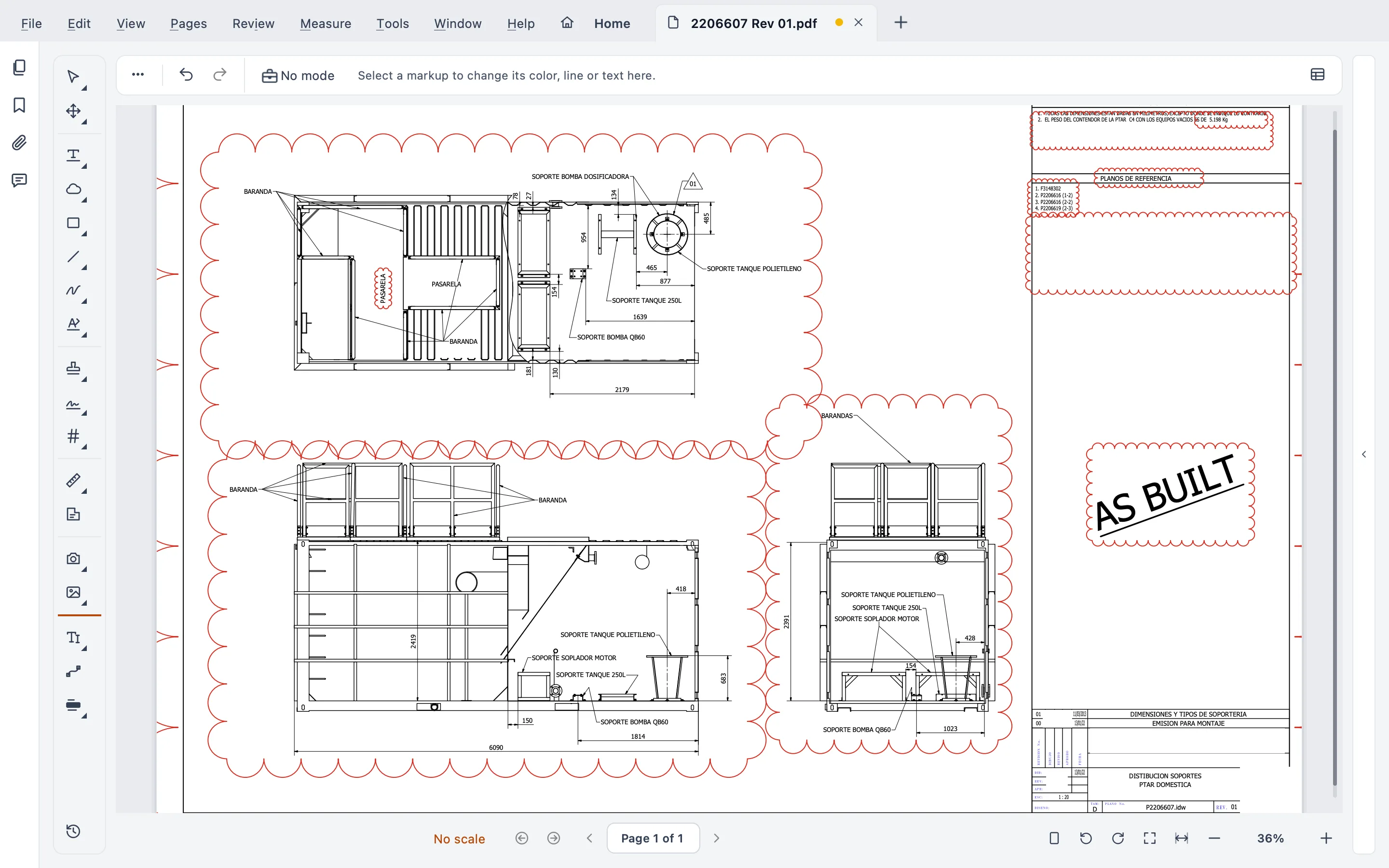
If your team reviews live in Bluebeam Studio every day, stay with Bluebeam. If you work on a Mac, want your drawings to stay on your computer, or would rather keep a version than pay rent forever, read on. For each option I tell you where it beats Stamppa, because a comparison that leaves that out is useless for deciding.
I’m Gus Mejía, construction project manager at Plano Base Arquitectos. I built Stamppa because I needed it on our own projects, and we use it there every day. So no, I’m not neutral. That’s why every fact about another product comes from the vendor’s own pages, with the link and the date I checked it listed at the end.
What sent me looking was the Mac. I work on a Mac, and Bluebeam stopped offering Revu for Mac in 2023. Call it stubborn, but I wasn’t going to keep a Windows machine around just to review drawings.
The short list
- Bluebeam Revu: the standard on Windows, with the strongest live collaboration (Studio).
- Adobe Acrobat Pro: the general PDF tool everybody already has, with basic measuring.
- Drawboard Projects: cloud review on Windows, iOS and the web.
- PlanSwift: takeoff and estimating software for estimators, on Windows.
- PDF-XChange Editor and Foxit PDF Editor: general PDF editors that many offices use as the budget option.
- Stamppa: a fast PDF viewer for drawing sets, on Windows and Mac, with markup, takeoff, compare, signatures and Batch Stamp. No cloud.
Side by side
| Stamppa | Bluebeam Revu | Acrobat Pro | Drawboard Projects | PlanSwift | PDF-XChange Editor | Foxit PDF Editor | |
|---|---|---|---|---|---|---|---|
| Desktop | Windows 10/11, macOS (Apple Silicon) | Windows | Windows, macOS | Windows (plus iOS and web) | Windows (Mac only through Boot Camp or a virtual machine) | Windows 10 and later | Windows, macOS |
| List price (US) | US$39/yr per person at the Founder price (first 100), or US$12/mo; Team US$33 per seat/yr, from 4. In Latin America, US$29/yr | US$260–590 per user/yr, 4 plans | US$19.99/mo on a yearly plan | US$270 per user/yr (Team), or US$29/mo | US$2,000 or US$3,000 per seat/yr | From US$62, perpetual, 1 year of maintenance | From US$10.99/mo, or US$209.99 one-time |
| Model | Yearly or monthly license; the version you pay for is yours forever (monthly: after 12 months in a row) | Subscription only; read-only when it ends | Subscription; back to the free Reader | Subscription | Yearly subscription | Perpetual license | Subscription or perpetual |
| Measure to scale | Length, area with cut-outs, perimeter, count, angle, volume, arc | Length and area in Basics; more from Core | Distance, perimeter, area | Length, rectangular and polygon area | Area, length and count, with automated takeoff | Calibrate, distance, perimeter, area, export to CSV | Distance and area |
| Compare revisions | Live on the sheet, text compare, whole set | From Core; batch slip sheet in Complete | Pro only | Overlay | Not its focus | Compare documents (Editor Plus) | Not verified |
| Live co-markup | No | Yes, Studio Sessions (host from Core) | No | Yes, cloud | No | No | No |
| Files stay on your computer | Yes, no cloud | Desktop, optional cloud | Desktop plus Adobe account | Cloud, offline in Windows and iOS apps | Desktop | Desktop | Desktop, cloud features in subscription |
These are list prices in US dollars from each vendor, before tax. Stamppa’s prices go by tiers: US$39 a year for the first 100 customers, and each tier closes when its spots are sold; the monthly plan is US$12 a month. In Latin America (Spanish-speaking countries and Brazil) the Founder price is US$29 a year, depending on your billing country, and in Europe €49 a year with VAT included.
What a construction team actually does with a PDF
Open a heavy set and keep working
This is the first test I run on any viewer: open the full architectural set and scroll it end to end. I won’t quote speed numbers I haven’t measured on your machine. What I can tell you is how Stamppa is built: each page is drawn in a separate process, so a heavy sheet never locks the window, and a sheet that fails to draw can’t close it. Sheet sets read many files as one document, with an index taken from the title blocks.
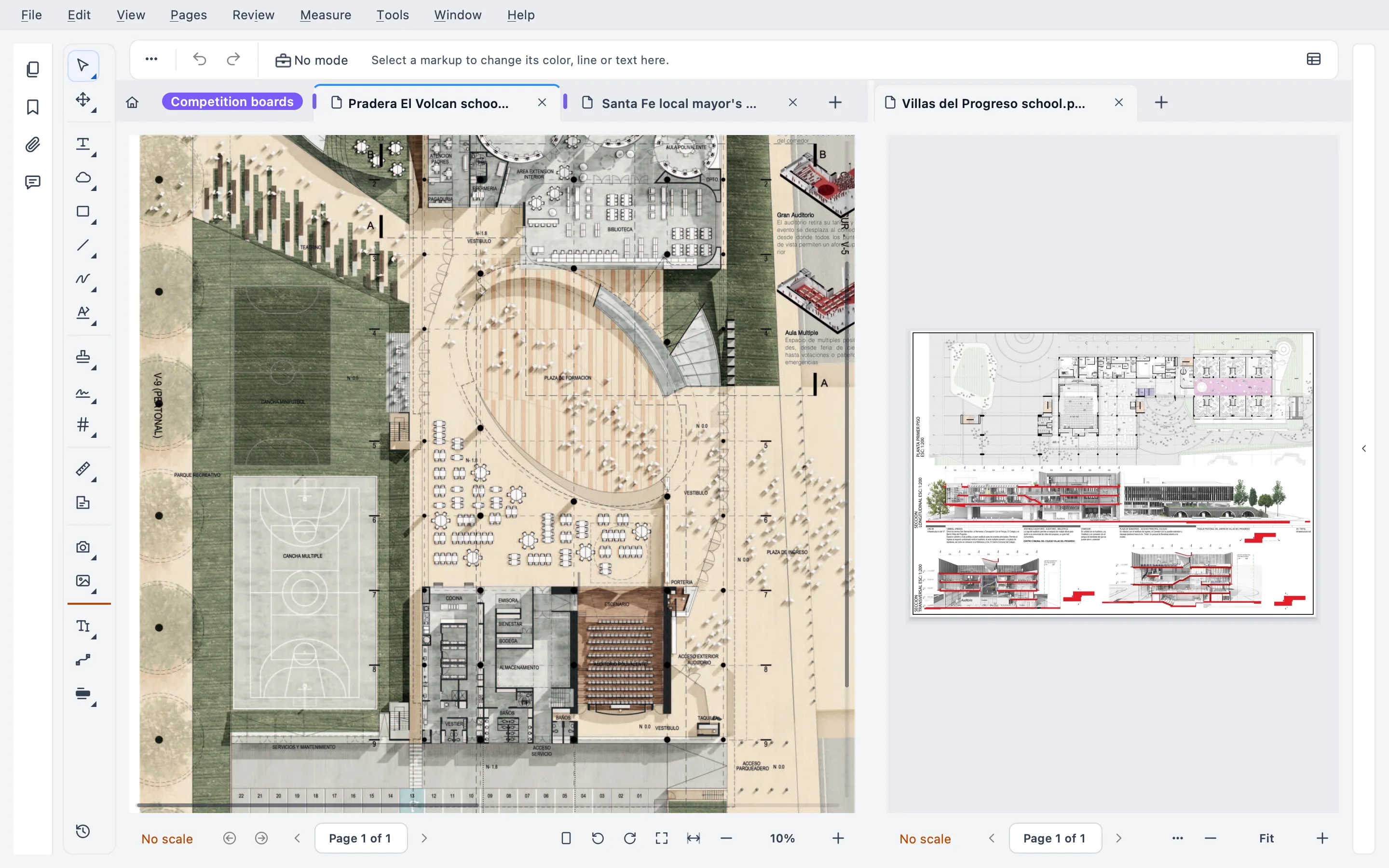
You test a viewer like a new grill: not from the brochure, but with what you cook every week. Try Stamppa on your heaviest set. That’s what the 14-day trial is for.
Markups and the Markups list
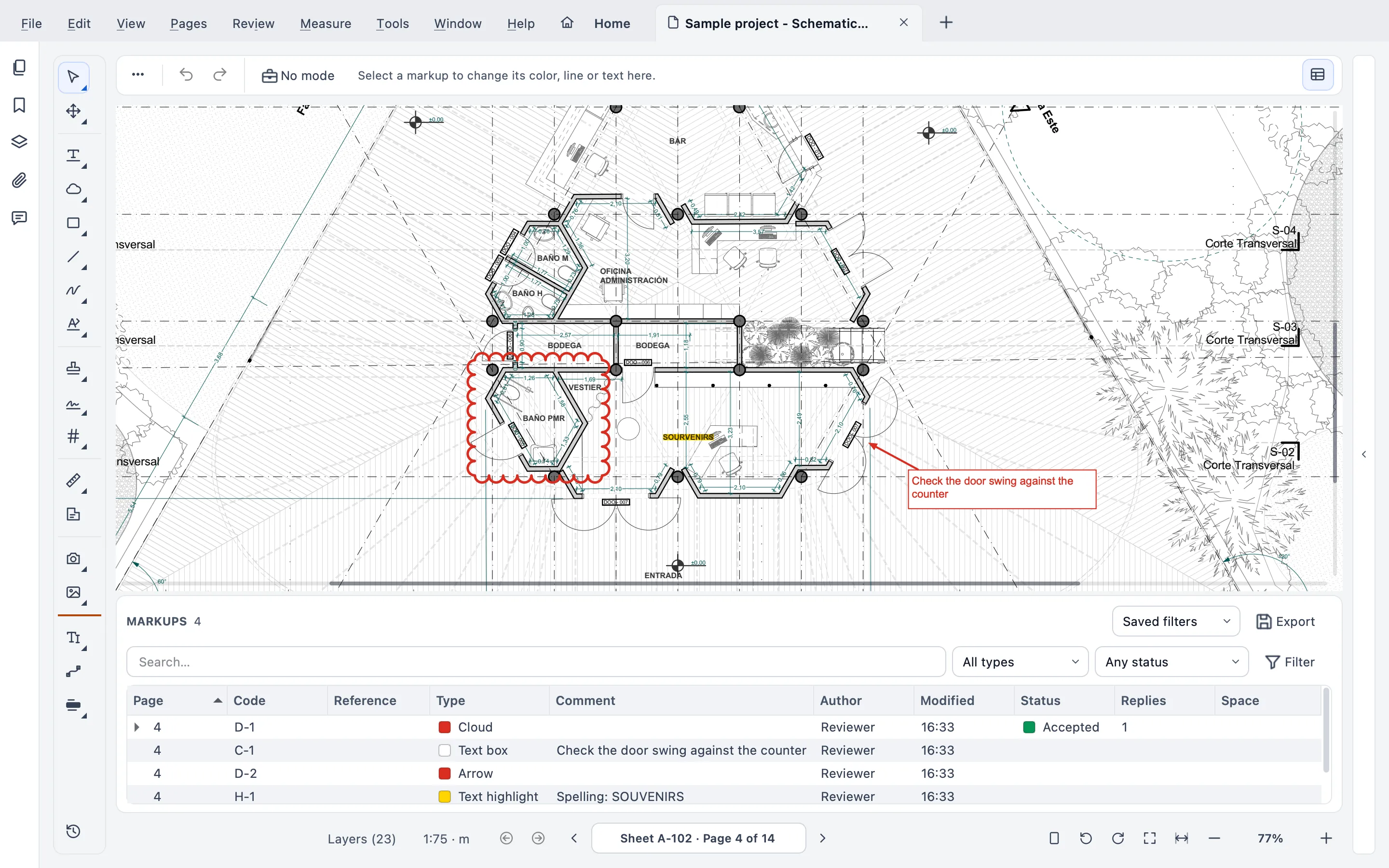
The Markups list is what keeps people on Revu, and rightly so. Stamppa has a Bluebeam-style list: every markup gets a code like M-0007, with custom columns, saved filters and layers per reviewer. Markups are standard PDF annotations, so the ones you made in Revu open in Stamppa and the other way around, and XFDF goes in and out through Review ▸ Markups.
Acrobat, PDF-XChange and Foxit all mark up a PDF well. But none of them is built around a list like that.
Measure and take off
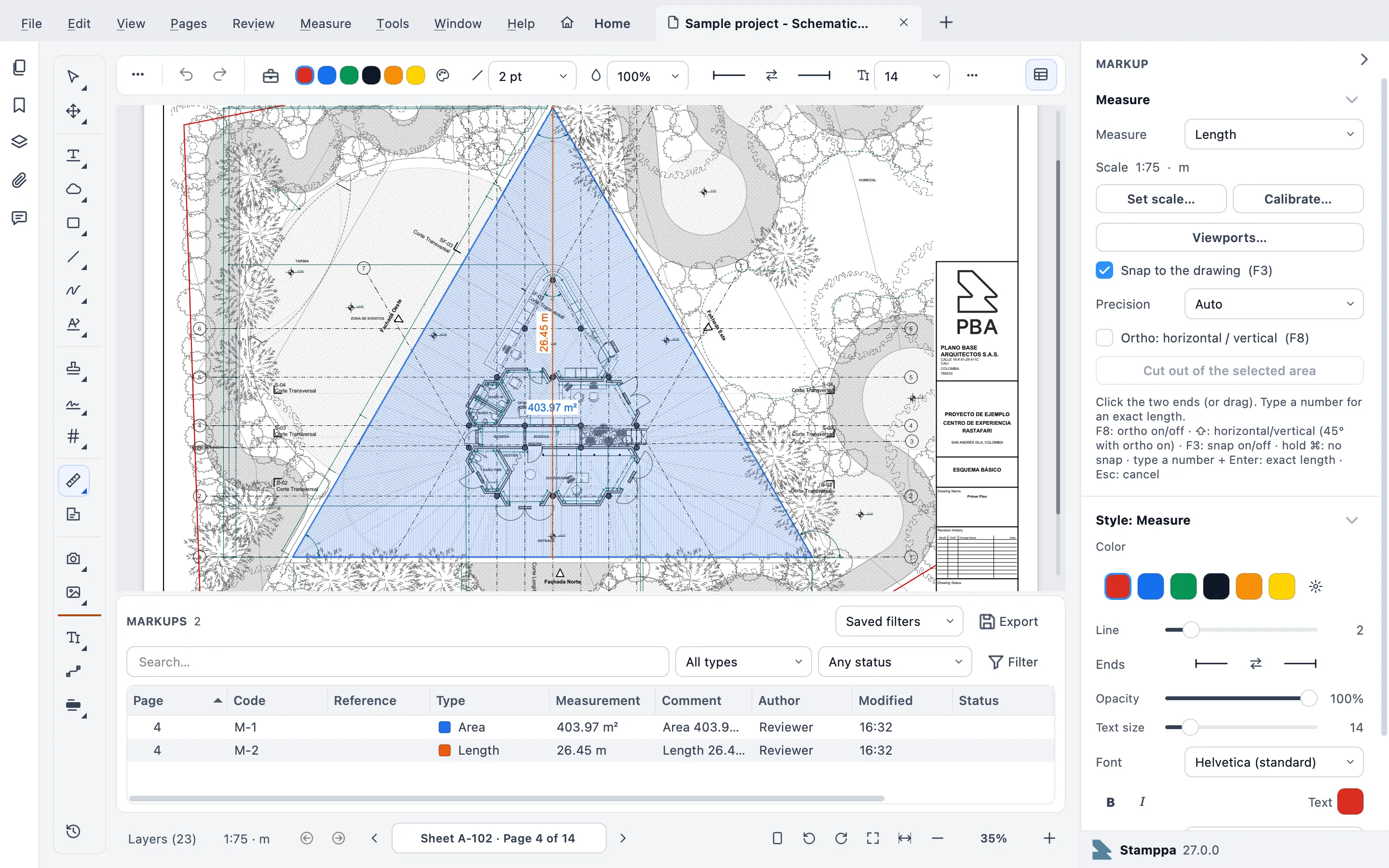
All seven tools measure, but not to the same depth. Acrobat measures distance, perimeter and area. Bluebeam Basics measures length and area; counts, volume and Quantity Link to Excel come in the higher plans. Stamppa measures length, area with cut-outs, perimeter, count, angle, volume and arc. It reads a scale set in Acrobat or Bluebeam as it is, sends quantities to Excel, and keeps a sheet up to date with Quantity link. And Mark all like this finds every matching symbol on a sheet or a whole set (vector drawings only, not scans).
What I take off most on site are counts: doors, windows, light fixtures and plumbing fixtures. I mark each one on the sheet, and the total is ready to go to Excel.
Where PlanSwift is stronger: it’s estimating software before it’s anything else. It has automated takeoff, assemblies that update as you measure, vendor training and a link to your estimating system. Stamppa can estimate from the takeoff (Measure ▸ Estimate: a price list, assemblies, totals by sheet, level and space, to Excel), but if estimating is your whole job, PlanSwift goes deeper. It is Windows only, though: on a Mac it needs Boot Camp or a virtual machine.
Compare revisions
Rev B lands and you need to know what changed before you build. Bluebeam compares from the Core plan and batch slip-sheets in Complete. Acrobat compares in Pro only, not Standard. Drawboard overlays two drawings, and PDF-XChange compares documents in Editor Plus.
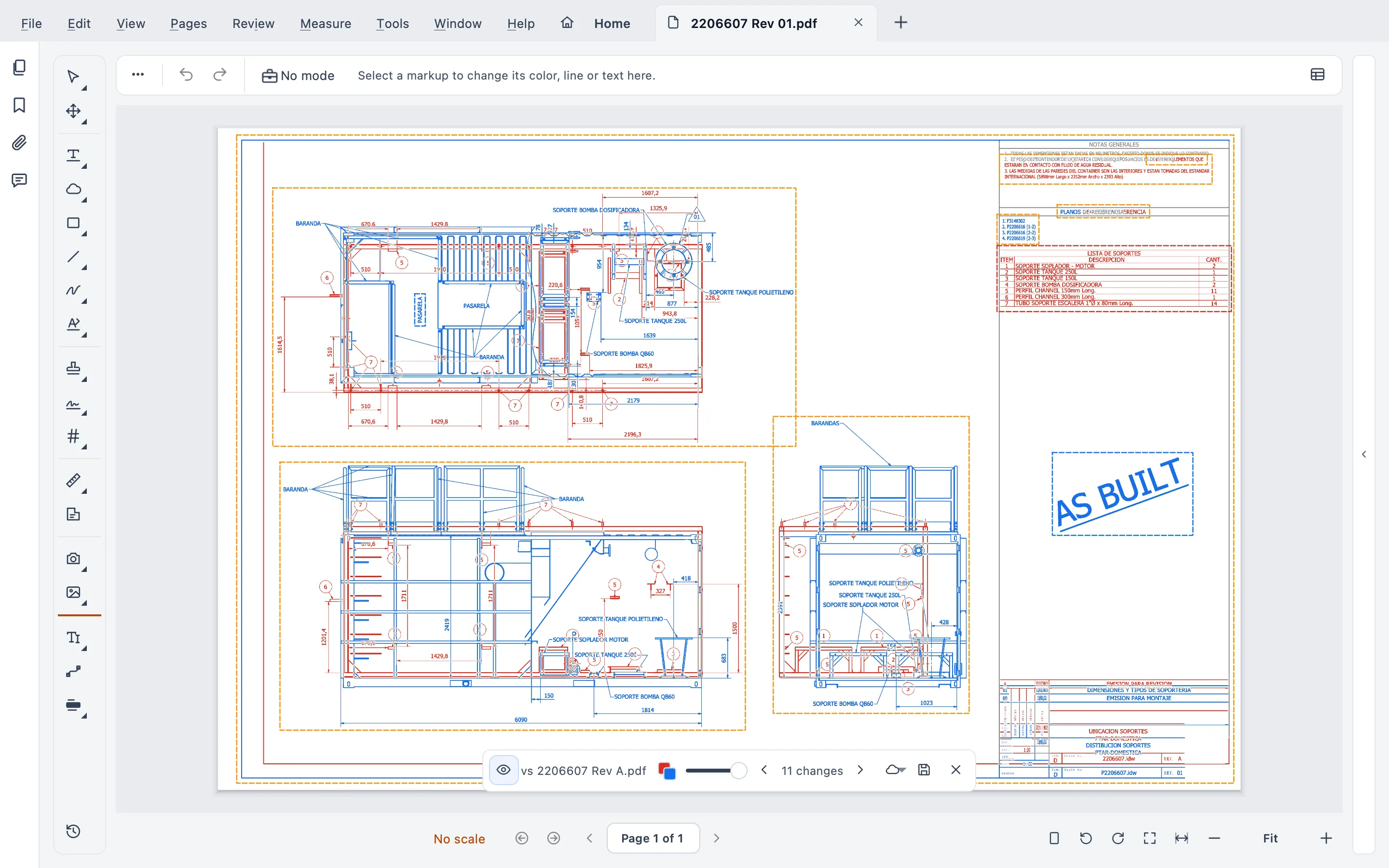
Stamppa compares live on the same sheet, without making another PDF. It also compares text, and compares and slip-sheets a whole set at once without losing your markups. Before a set goes out, Review ▸ Check the set… looks for call-outs to sheets that don’t exist, titles that differ from the index, duplicate sheet numbers and revision dates out of order, with fixed rules and no AI.
Batch stamp
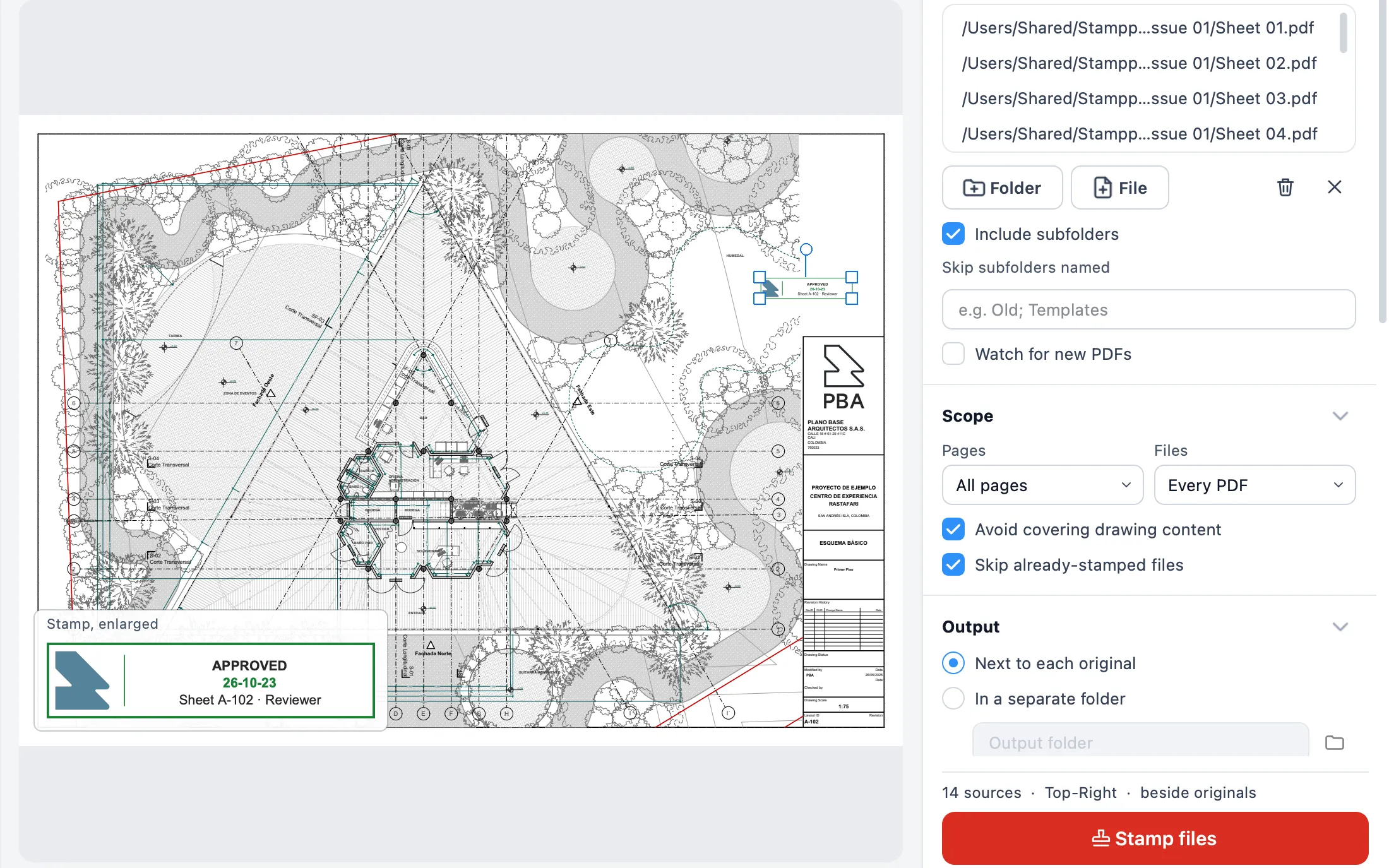
Received, Approved or For Construction, on a whole folder in one go. Batch Stamp is the original Stamppa: dated, numbered stamps filled in from each title block, a check before every run, one-click undo and a transmittal. You can try it in your browser at /demo/ without installing anything.
Sign
Acrobat and Foxit PDF Editor+ come with an e-signature service, with requests and tracking. Bluebeam includes batch signatures and seals in Complete and Max.
Stamppa signs with a certificate (PAdES, with long-term validation) from a .pfx file, the Mac Keychain or the Windows certificate store, and it can sign a whole set at once. Review ▸ Stamp & sign ▸ Request signatures… asks other people to sign in order; the request and every signature travel inside the PDF, with no outside service. A drawn signature doesn’t prove who signed. A certificate does. Which signature your licensing board or agency requires depends on where you work, so check before you issue.
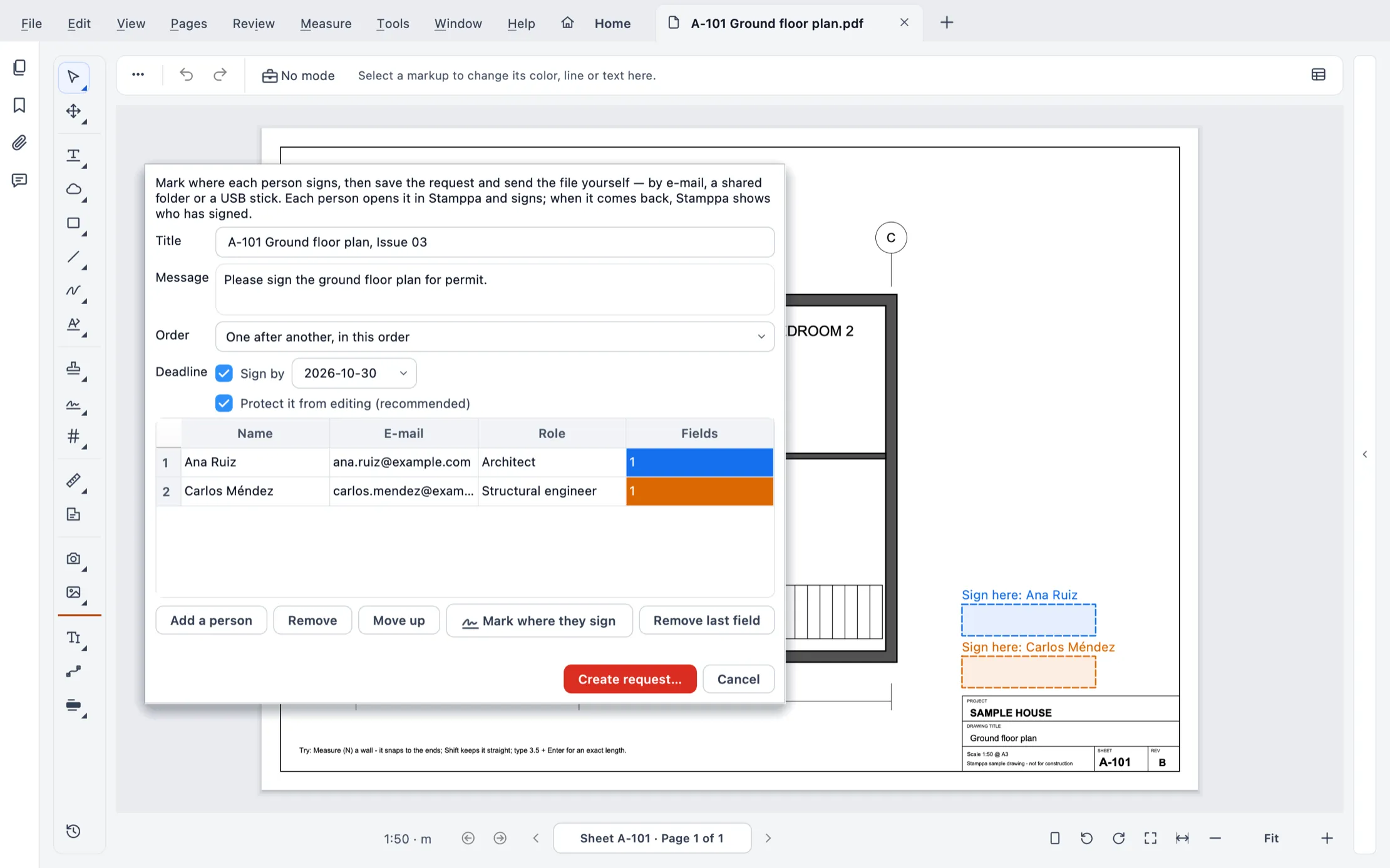 Request signatures: two signers in order, a due date, and their boxes on the sheet.
Mac and Windows
If your office mixes Macs and PCs, this narrows the list fast. Bluebeam Revu, PlanSwift and PDF-XChange are Windows desktop apps. Drawboard Projects runs on Windows, iOS and the web. Acrobat and Foxit run on both. Stamppa runs natively on Windows 10/11 and on Macs with Apple Silicon (not Intel Macs).
Offline and privacy
Stamppa works offline. It connects only to confirm your license, when you open it and when you ask it to, never in the background, and it never sends your documents. With the signal you get on a job site, that matters.
The flip side is no cloud. Sorry, but that means no live co-markup, and no iPad or phone app. Bluebeam’s cloud is optional; Drawboard Projects is built on the cloud, with offline markup in its Windows and iOS apps.
Price model: rent or keep
Bluebeam sells subscriptions only, and when a plan ends, Revu turns read-only. Acrobat goes back to the free Reader. PDF-XChange sells a perpetual license with a year of updates, and Foxit offers both.
With Stamppa you pay once a year, and Stamppa 27 stays yours forever, with every feature and every 27.x update, including the ones released after you cancel. If Stamppa 28 comes out while your license runs, 28 is yours too. It renews at your same price, and you can cancel in one click. There is also a monthly plan: after 12 months paid in a row, the version of that day is yours. Without a license, it stays a free reader: view, print, notes, highlights and clouds.
Who each one is best for
The facts are above. This part is my opinion, not a rule:
- Bluebeam Revu: Windows teams that review together in Studio Sessions or need Bluebeam on the web and mobile. Its ecosystem and the number of people who already know it are real advantages, and I don’t underrate them.
- Acrobat Pro: offices that mostly do general PDF work and e-signatures, with light measuring.
- Drawboard Projects: teams that want cloud review with guests, on Windows, iOS and the web.
- PlanSwift: estimators who bid all day on Windows.
- PDF-XChange Editor: Windows users on a tight budget who want a perpetual license.
- Foxit PDF Editor: general PDF editing on both platforms, with a one-time purchase option.
- Stamppa: project managers, architects and engineers on Mac, Windows or both, who review, measure, compare, stamp and sign drawing sets on their own computer, alone or by sharing files.
At Plano Base we use Stamppa for drawing control (receiving, stamping and issuing sets), for reviewing designs and marking up comments, and for approving and signing submissions.
If you’re coming from Revu, the Bluebeam alternative page walks you through the switch in three steps. If you’re coming from Acrobat, see Stamppa vs Acrobat. And since the switch usually comes down to two jobs, read about comparing drawing revisions and measuring PDF drawings to scale.
If something in this comparison doesn’t line up with how your team works, email us.
Download Stamppa and try it free for 14 days with every feature, just your email, no card. Make the first file you open your heaviest set.
Tested with Stamppa 27.0.0.
Sources
All checked on 2026-10-23 unless noted.
- Bluebeam pricing (plans, prices, platforms, features by plan): https://www.bluebeam.com/pricing/
- Bluebeam, Revu for Mac end of life: https://support.bluebeam.com/articles/revu-for-mac-end-of-life-eol-announcement/
- Bluebeam, read-only mode after a subscription expires: https://support.bluebeam.com/articles/bluebeam-account-read-only-mode-after-subscription-expires
- Adobe Acrobat pricing (US prices checked 2026-10-22; on 2026-10-23 the page served Canadian prices to our location, and compare was confirmed Pro only): https://www.adobe.com/acrobat/pricing.html
- Adobe, measuring tool in Acrobat (checked 2026-10-22): https://helpx.adobe.com/acrobat/using/grids-guides-measurements-pdfs.html
- Adobe Acrobat technical requirements (checked 2026-10-22): https://helpx.adobe.com/acrobat/desktop/get-started/learn-the-basics/tech-requirements.html
- Drawboard pricing (Projects plans, platforms, offline, measuring, overlay): https://www.drawboard.com/pricing
- PlanSwift product page: https://www.planswift.com/
- PlanSwift pricing: https://www.planswift.com/pricing
- PlanSwift system requirements (ConstructConnect help center): https://help.constructconnect.com/getting-started-with-planswift-117/planswift-system-requirements-1649
- PDF-XChange Editor product page (platforms, perpetual license, measuring, compare): https://www.pdf-xchange.com/product/pdf-xchange-editor
- Foxit PDF Editor product page (platforms, pricing, signatures): https://www.foxit.com/pdf-editor/
- Foxit PDF Editor for Windows manual, measure tools: https://resource-cms.foxit.com/foxit-pdf-editor-for-windows/about-measure-tools
- Stamppa features: Stamppa 27.0.0 release notes, https://stamppa.com/changelog/#27.0.0
Questions
Is there a Bluebeam Revu for Mac?
Not anymore. Bluebeam set the end of life of Revu for Mac on June 28, 2023, and points Mac users to Bluebeam on the web or Revu for Windows through Parallels. Revu for iPad was removed from sale and support at the end of 2025. Stamppa runs natively on Macs with Apple Silicon.
What is the cheapest Bluebeam alternative for construction drawings?
On price alone, PDF-XChange Editor is hard to beat on Windows: a perpetual license from US$62 with one year of maintenance, but there is no Mac version. Stamppa is US$39 a year at the Founder price for the first 100 customers, or US$12 a month, on Windows and Mac, and if you don't buy, it stays a free viewer.
Can Stamppa replace PlanSwift for estimating?
For takeoff with a price list, assemblies and totals to Excel, often yes. If your estimating department lives on automated takeoff, vendor training and a link to an estimating system, PlanSwift goes deeper.
Will my Bluebeam markups open in another app?
Markups saved inside the PDF are standard annotations, so Stamppa, Acrobat and most PDF editors show them. Stamppa also imports and exports XFDF. What it doesn't read is .bax, Bluebeam's own markup export.
Do I need the cloud to review drawings as a team?
Only if you want to mark up the same sheet at the same time as other people. Bluebeam Studio Sessions and Drawboard Projects do that. Stamppa works through files: you send out a review round, and the markups come back and merge into your PDF.